Usage
After pip-installing TransitionListener, you can easily start using it
from your terminal. It is really simple to get started.
Configuration files
All it takes is a human-readable configuration file, a .yaml file, which
specifies the model parameters, scanning ranges, and desired outputs.
You can find example configuration files in the config/ directory of the TransitionListener repository.
Single point evaluation
Let’s say you have created a configuration file named example_point.yaml in the example/ directory, which specifies a benchmark point which you would like to know of whether it features a first-order phase transition and what gravitational wave signal it produces.
You can run TransitionListener using the command line interface as follows:
$ tl -c examples/example_point.yaml -v
This command will execute TransitionListener with the specified configuration
file and enable verbose output. This will
print detailed information about the progress of the computation to the terminal.
When the computation is finished, the results
will be saved to the scans directory to a subfolder as specified in the configuration
file. In there you will find
various output files, including 0_Input_params.txt reminding you of the chosen input parameters,
1_All_params.txt showing all computed parameters during the performed run, as well as
2_Observability.txt containing the computed observability metrics. Further, additional
plots and log files including information about the computation process are saved there.
Grid and line scans
If you want to run a small grid scan using the command line interface, you can use the following command:
$ tl -c examples/example_grid.yaml -j 10
The -j flag specifies the number of parallel jobs to run. Here we took 10 jobs. This can speed up the scan significantly on multi-core machines. The above scan takes a only a couple of minutes on a modern machine. After the scan is complete, the results will be saved in the specified output directory. You will find various output files, including also the following overview plot.
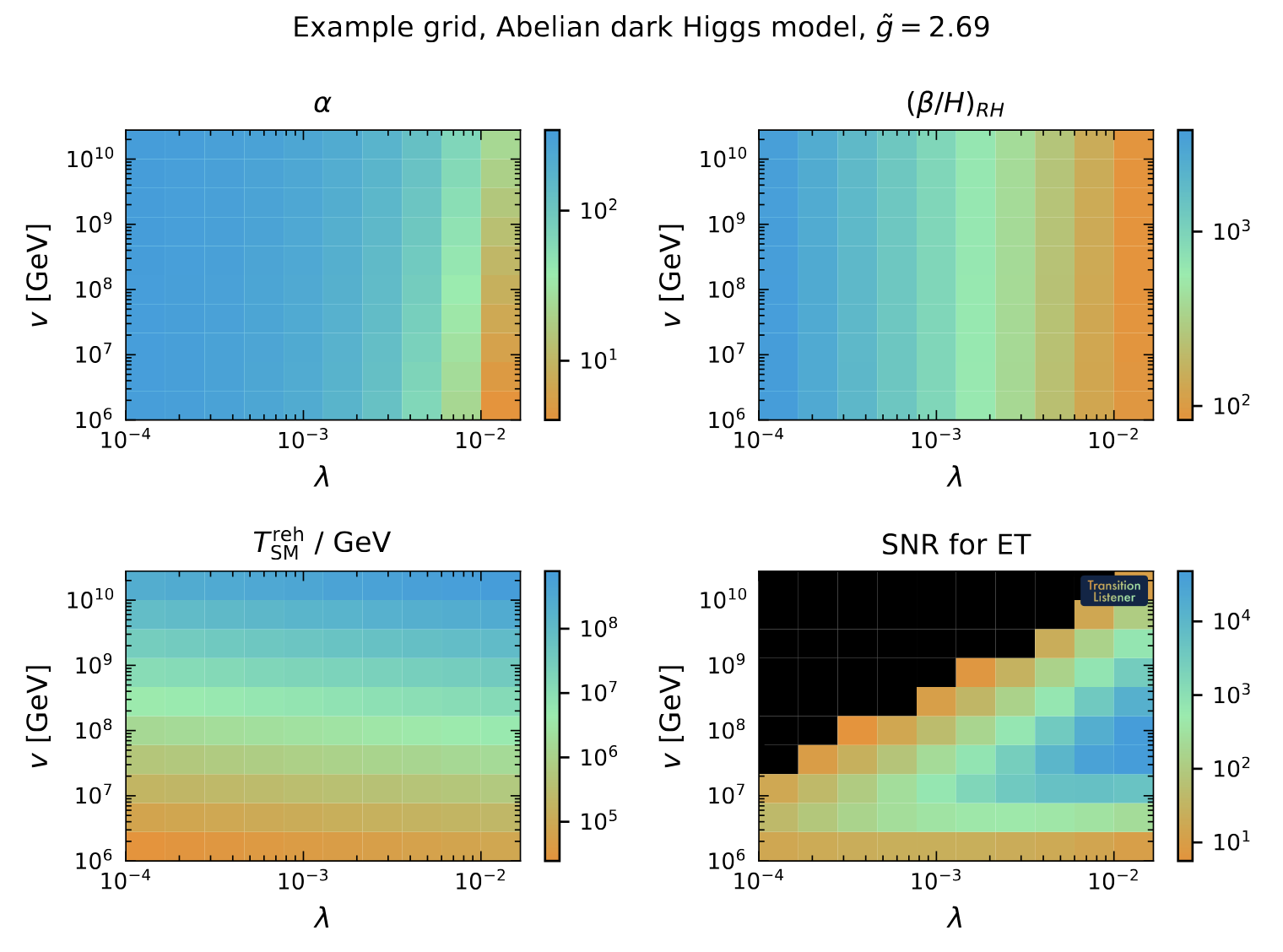
On top of that, you will find close to 200 intermediate results saved in the output directory,
in the form of .txt files as well as .pdf plots.
Alternatively, you can also run an example line scan using the following command:
$ tl -c examples/example_line.yaml -j 5
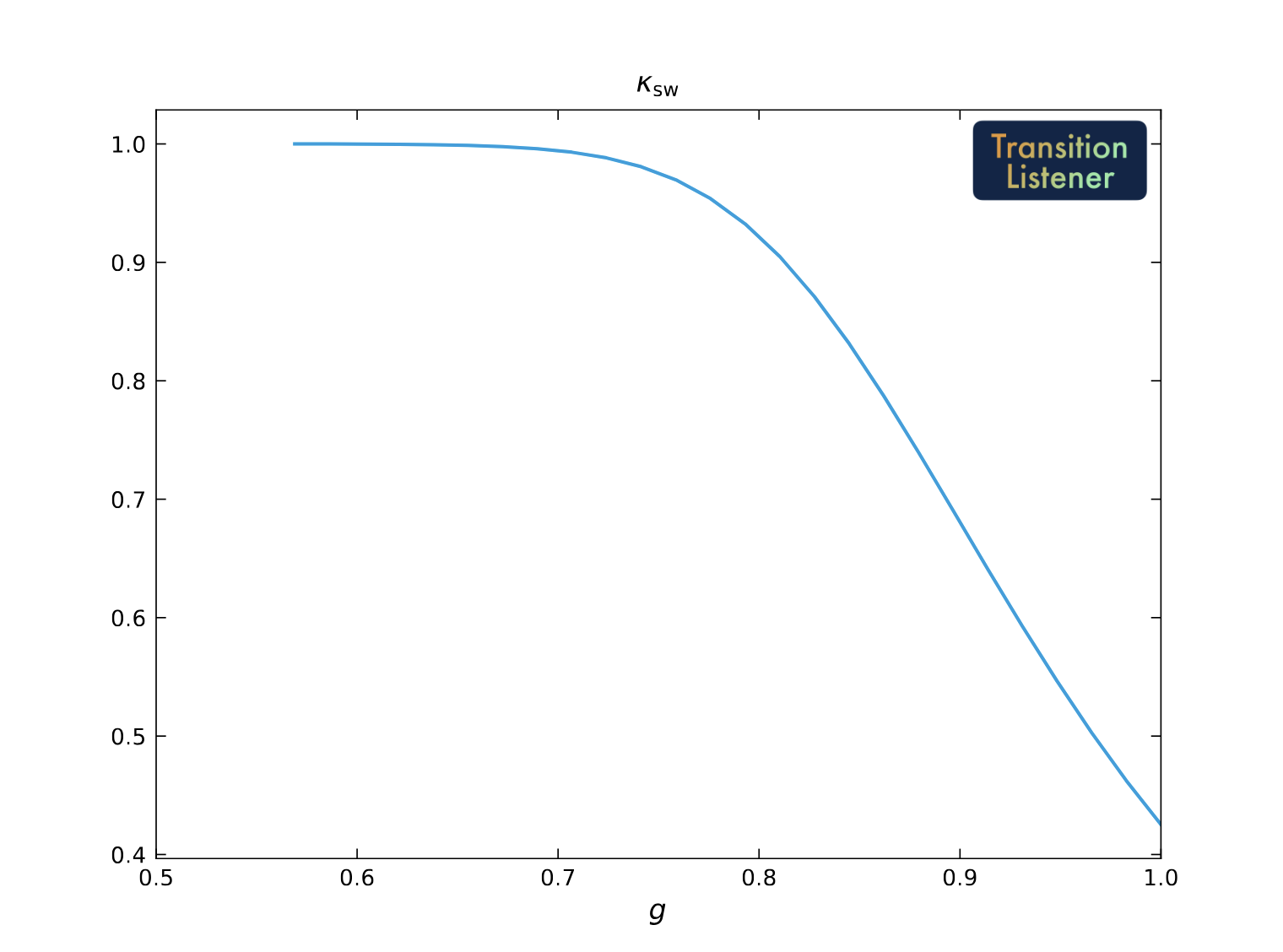
This will perform a line scan over the specified parameter range with 5 parallel jobs. The results will be saved in the output directory as specified in the configuration file. The output is very similar to the grid scan case. For instance, you will find the efficiency factor for converting released vacuum energy to bulk fluid motion among them:
Percolation algorithm controls
TransitionListener exposes two percolation solvers through the configuration:
adaptive_step_sizeis the default. It does not require a nucleation- temperature seed and instead builds an adaptive support bank for \(P(T)\) on the fly: the controller scouts the bubble-nucleation-rate peak, protects the high-temperature onset where the bubble nucleation rate is still very small, and then refines the temperature interval in which the true-vacuum fraction increased from zero to one. It further rejects points with unresolved bounce action jitter. The percolation integral is solved via an ODE solver (percolation_integral_method = "ode") using the time-temperature relation in the false vacuum dervied from the speed of sound in that phase.fixed_step_sizeis the an alternative solver of the percolation integral, which sometimes gives more robust results when the adaptive step size solver fails due to numerical instabilities. It evaluates the percolation integral on a precomputedTSYMgrid of sizepercolationConf.n_action(default30;n_action = 100gives the high-resolution benchmark setup). As it requries a nucleation temperature as as seed, which first needs to be computed, it is a bit slower on average and cannot deal with cases in which the \(\Gamma = H^4\) condition can never be satisfied, i.e. for extremely slow phase transitions. For most cases, this mode is however a good alternative, in case any unexpected behavior occurs during the percolation computation.
The most important controls are:
percolation_algorithm_mode:adaptive_step_sizeorfixed_step_size.percolation_integral_method:ode(default) ordouble_integralfor diagnostics.percolation_time_temperature_mode:sound_speed(default) uses the symmetric-phase \(c_s^2(T)\) and the cosmological scale-factor ratio \(a(T)/a(T_\mathrm{hot})\) inside the percolation integrand.bagfalls back to the \(c_s^2 = 1/3\) limit (no scale-factor weighting).percolation_entropy_definition: which entropy fixes the time-temperature relation, and so both the sound speed and the scale factor.dof_table(default) counts the free particles of the traced phase at their zero-temperature masses and adds the tabulated coupled bath;eff_potentialtakes \(s = -\mathrm{d}V/\mathrm{d}T\) from the effective potential, with thermal masses and the Arnold-Espinosa daisy. Only the adaptive step size solver reads this setting; the fixed step size solver refuses anything but the default, because its time-temperature relation is its own.percolation_entropy_scheme_diagnosticandpercolation_entropy_scheme_warn_threshold: every adaptive step size run insound_speedmode compares the two entropy definitions on the percolation support and reports how far apart they are, inDIAG:entropy_scheme_cs2_spreadandDIAG:entropy_scheme_lna_gap. The fixed step size solver does not read this setting at all and refuses anything but the default, so it has nothing to compare: it writes the flag as false and both diagnostics asnan. The same combination, a false flag beside twonan, means “not compared” and not “compared and found to agree”; it also arises inbagmode, with the comparison switched off, and where the expansion history could not be built. The first is the median relative difference between the two definitions’ \(3 c_s^2\) over the percolation support, and estimates to about 30% how far the mean bubble separation of that point moves between them.WARNING:entropy_scheme_sensitiveis raised when it exceeds the threshold, 4% by default, so a flagged point is one whose \(R_*\) is uncertain at about the five per cent level from this modelling choice alone. Lower the threshold to see weaker cases.gwConf.sound_speed:"compute"(the default) takes the sound speed of the plasma from the effective potential;"1/3"uses the massless value \(1/\sqrt{3}\); a number strictly between zero and one is used as \(c_s\) itself. Both percolation solvers accept all three.In
"compute"mode a value of one or more is refused rather than replaced, with CLI error code 18, for the symmetric phase as well as the broken one: \(c_s\) sets the speed at which the bubbles grow, \(\max(v_\mathrm{wall}, c_s)\), and the spectrum divides by \(v_\mathrm{wall} - c_s\), so a value that is not a speed has no meaning downstream. Which thermodynamics a model has is the user’s choice, so nothing is substituted; setsound_speedto"1/3"or to a number to run such a point anyway. A phase that has simply frozen out, where the ratio is zero over zero or negative, is still reported asnanand is not an error.CLI error code 8 is raised from two different stages, and the message says which. While the transition path is being built, it means a candidate reached the nucleation solver and the solve did not succeed, which may be because the transition is too supercooled to nucleate one bubble per Hubble volume or because the solve failed numerically; the error does not distinguish those and says so. Later, during percolation, it means the transition was found and its actions computed but the true vacuum fraction never reached
f_percover the temperature range explored, and the message gives the fraction reached and the lowest temperature tried.CLI error code 19, no viable phase pair, comes only from the first of those stages and is the narrower statement: the nucleation solver was never reached, because no pair of phases below the current one was a tunnelling candidate at all. A child never becomes a candidate for one of two reasons, that it duplicates a child already offered or that the two phases do not overlap in temperature. A pair that is evaluated can still be refused, and the counts report that apart: in the adaptive backend a candidate is refused when the starting phase is already the deeper minimum at the cold end of the overlap, when it does not exist to a higher temperature than the target, or when the potential difference could not be evaluated there; on the fixed-step path it can instead fail the nucleation solve. Nothing about the rate was computed, so nothing about supercooling is being claimed. Its message, and the transition-path form of code 8, report how many child phases were listed, how many were evaluated as candidates, and how many ended in a nucleation solve that did not succeed; run with
verbose=Trueto see each phase pair. Those three counts belong to the transition-path stage alone. The percolation form of code 8 carries none of them, because at that point the transition has already been found; it reports the fraction reached and the lowest temperature tried, as above. So a scan reading code 8 should take the counts as present only when the message is the transition-path one.WARNING:noisy_c_sandDIAG:c_s_step_change: whether the computed sound speed survives a change of the derivative step. A value can be round-off and still lie between zero and one, so no test on the value itself finds it; the step is varied by a factor ten in each direction and the larger relative change is reported, with the warning raised above 5%. On a healthy point the change is of order \(10^{-7}\). A value that is refused at one test step and not at another is noisy, because it stopped being a speed somewhere inside the step range and no single step shows that; one refused at every step is not, since it does not depend on the step and the refusal itself already reports it.nanmeans the change could not be put as a ratio, which happens when the value does not exist at one of the steps or is infinite at all of them.WARNING:daisy_outside_validityandDIAG:daisy_over_radiation: whether the Arnold-Espinosa daisy resummation is being used where it does not apply. That term resums the bosonic zero Matsubara mode, which is justified for \(m \ll T\). For \(m \gg T\) a mode should be Boltzmann suppressed, and the one-loop thermal integral is; the daisy term is not, going instead as a power of the temperature. Where it dominates, the free energy goes as \(T^3\) rather than \(T^4\) and \(c_s^2\) drifts towards \(1/2\) instead of the \(1/3\) of radiation. The diagnostic is the ratio of the daisy term to the field-independent radiation, and the warning is raised when that exceeds one and the lightest mode has \(m/T > 1\); both are needed, because at high temperature a large ratio is legitimate. This reports a modelling choice, not an error, and nothing is corrected. It applies only todaisy = "ArnoldEspinosa"; with"Parwani"or"off"there is no such term in the potential and both come back as a false flag beside anan.The daisy term itself needs the thermal part of the boson masses, \(\Pi\). Where a model writes its Debye masses in closed form it should override
generic_potential.debye_massSq; otherwise the base class measures them, by reading the \(T^2\) coefficient off the model’s own spectrum at a temperature where the difference of the spectra still keeps its digits. That the thermal part is quadratic is verified rather than assumed, and the base class falls back to the difference of the two spectra wherever it is not. It is not, for every model whose bosonic masses are eigenvalues of a mass matrix that mixes: the entries of such a matrix go as \(T^2\) but its eigenvalues do not. Of the models shipped inmodels/, the two dark \(U(1)\) parameterisations, the conformal dark \(U(1)\) and the template get an exact \(\Pi\), while the three 2HDM models and the dark flip-flop use the difference.A model that rewrites the effective potential must override
generic_potential.V_thermalas well asVtotandV1T_from_X. It returns the temperature-dependent part on its own, including the radiation bath itsinclude_decoupledargument selects, and the sound speed, the transition strengths and the wall velocity are all taken from it. OverridingVtotorV1T_from_Xwithout it raiseserrors.PotentialError: those two differ in whether they carry the bath and the daisy term, so neither can be used to stand in for it, and reconstructing one from the mass spectrum would not be the model’s own.percolationConf.n_action: fixedTSYMsupport count forfixed_step_sizeruns.percolation_n_action_min,percolation_n_action_increment,percolation_n_action_max,percolation_max_action_temperatures,percolation_maxit: support-bank controls foradaptive_step_size.percolation_jitter_GH4_threshold: the bounce-rate jitter detector (in \(\log_{10}(\Gamma/H^4)\)) – default1.0; raise to2.0or so on models with very steep, deeply supercooled action profiles.percolation_max_log10_rate_step: largest change of \(\log_{10}(\Gamma/H^4)\) allowed between neighbouring support points – default12.0. Intervals above it are refined before jumps in \(P\), because the percolation integral interpolates the logarithm of the rate and cannot resolve a rise that happens inside one interval. Zero switches the criterion off.percolation_acc_tperc,percolation_acc_tfinal,percolation_acc_rh: refinement and stopping controls foradaptive_step_size.
All of these can be set globally in the YAML configuration or directly in a
model file via setConfigParameters() when model-specific defaults are
desired. The default configuration uses adaptive_step_size with the
ode / sound_speed integral, so most users do not need to touch any
of these knobs.
Precision modes
The tracing and tunnelling precision presets are configurable through
precision_mode:
default– vanilla settings.robust– tighter phase tracing only.xtrace– still tighter tracing (very smalldtstart,dtmin).tunneltight– default tracing plus tighter bounce path-deformation tolerances.benchmark– tightens both tracing and tunnelling. Note: While being the most precise mode, it can be computationally expensive, with runtimes of a single computation of over one hour, in the case of multi-dimensional scalar potentials.
Radiation baths
Radiation that is not part of the potential belongs to one of two baths, set
in the model’s init:
kin_coupled_e_geffandkin_coupled_p_geff(default: the Standard Model) describe radiation in thermal contact with the fields of the potential. Together they form the transitioning sector, which is reheated inside the bubbles.kin_decoupled_e_geffandkin_decoupled_p_geff(default: empty) describe radiation that is not. It is not reheated inside the bubbles, keeps the temperature of the surrounding false vacuum and enters the expansion rate and the redshift of the gravitational-wave spectrum. Withpot.config.gwConf.coupled_hydrodynamics = True(the default) it also moves with the fluid and enters the hydrodynamics and the strengthalpha.
For a dark sector decoupled from the Standard Model, move e_geffSM and
p_geffSM from the coupled to the decoupled bath, set the coupled bath to
zero, and set pot.config.gwConf.coupled_hydrodynamics = False, so that the
Standard Model does not enter the hydrodynamics either. TL takes the bath whose
tables are e_geffSM as the Standard Model bath; if the tables are wrapped,
set self.SM_bath = "decoupled" (or "coupled") in the model. It warns if
both baths hold e_geffSM. A model whose potential contains Standard Model
fields (flagged is_SM, e.g. the 2HDM) has the Standard Model in its
transitioning sector; TL then refuses a decoupled Standard Model, while other
radiation, e.g. of a dark sector, can still go into the decoupled bath.
Both baths share the temperature before the transition, so Tnuc_SM_GeV and
Tperc_SM_GeV apply to both. Treh_SM_GeV is the temperature of the
Standard Model bath at reheating, which happens at percolation: the reheated
temperature if the Standard Model is coupled, Tperc if it is decoupled.
Treh_DS_GeV is the reheating temperature of the transitioning sector.
g_eff_tot_reh and h_eff_tot_reh sum the fields of the potential, the
coupled bath and the decoupled bath, each weighted by its temperature ratio to
the Standard Model bath to the fourth and third power. The redshift assumes
that the energy and entropy of the dark sector end up in the photon bath
without entropy injection (dilution factor D = 1). Two simplifications
apply: the decoupled bath is evaluated at the temperature of the transitioning
sector until the transition, although the two can drift apart where the
degrees of freedom of either change, and the evolution of the temperature ratio
after the transition is not modelled. For the same reason a decoupled bath is
only consistent for the first of several transitions: after it, the bath is
colder than the transitioning sector.
Random and nested sampling scans
You can also run a random scan by using the following command:
$ tl -c examples/example_random_conformal.yaml -j 10
This will perform a random scan over the specified parameter ranges with 10
parallel jobs. The results will be saved in the output directory in a .csv file.
You can use this file
to analyze the results further or visualize them using your preferred plotting tools.
If you are interested in performing a nested sampling scan using mpi for
parallelization you can use the following command:
$ mpiexec -n 16 tl -c config/example-nested-scan.yaml
This will run a nested sampling scan with 16 parallel processes.
The results will again be saved in a .csv file in the specified output directory.
For detailed installation instructions and usage examples please refer to the following sections:
Installation: Installation Guide
Usage: Usage
For more information, visit the documentation at https://tasillo.de/TransitionListener_development or check out the code repository at https://github.com/tasicarl/TransitionListener.